Rank in Google with LinkedIn articles
Enter your niche, or your website. LinkedSerp finds long tail keywords with real search volume, checks the live Google top 10 for a LinkedIn article, and writes the piece you paste into LinkedIn.
10 keywords, checked live against Google. No sign-up for the sample.
Why LinkedIn articles
Google already trusts LinkedIn. Borrow that trust.
A LinkedIn article publishes on one of the most authoritative domains on the web. For specific, long tail searches it can reach page one in days, where your own site would take months.
- Most long tail searches have no LinkedIn article at all.Those are open. You write the first one and Google has nothing else from LinkedIn to choose.
- When one does rank, you see it.Position, title and a link to the exact article, so you can decide whether to compete or move on.
- You publish it yourself.No auto-posting and no access to your account. One click copies the article in LinkedIn's formatting.
The founder's own result
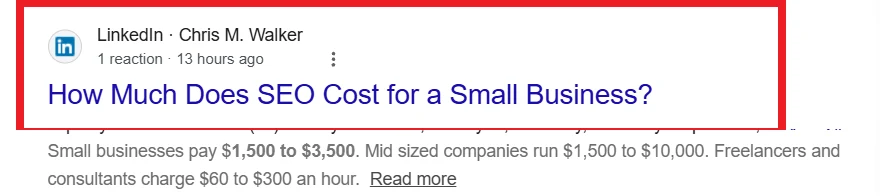
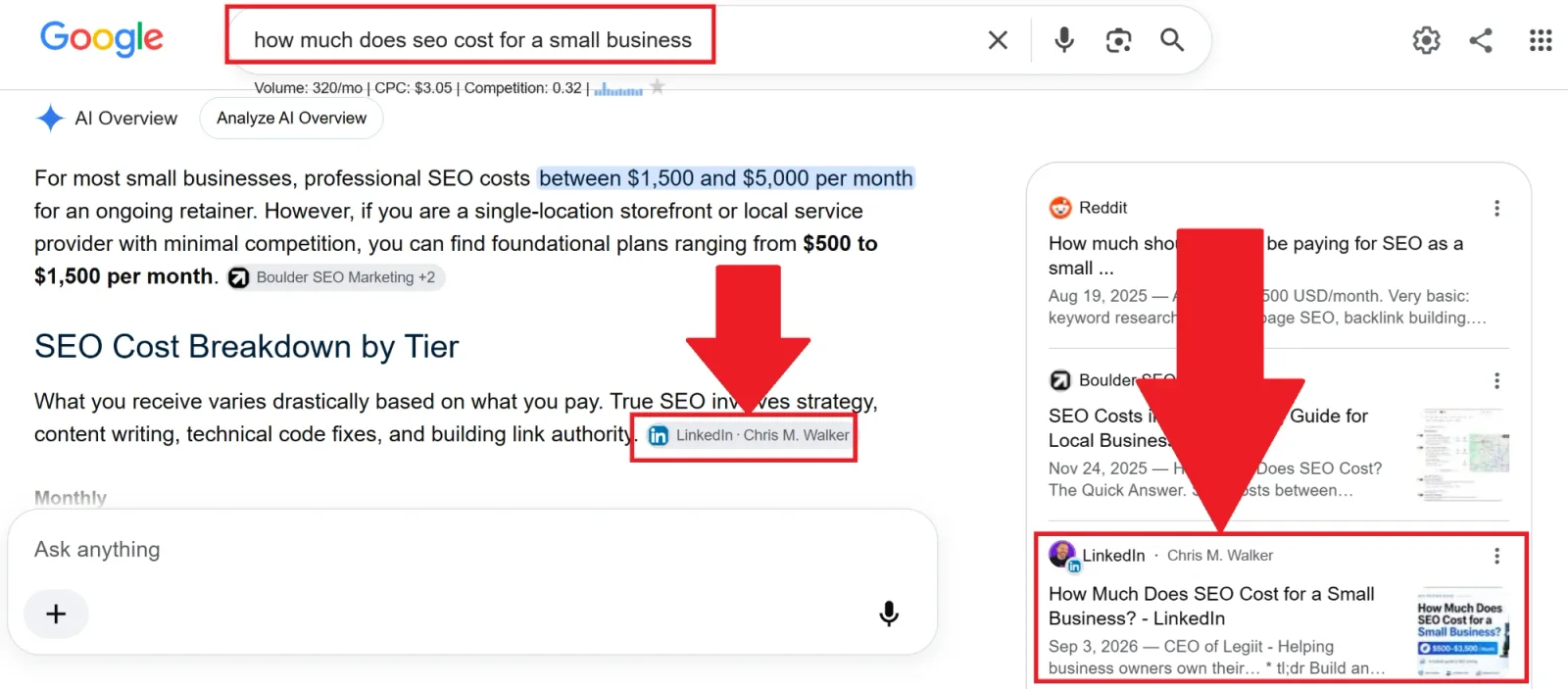
In Google's AI Overview 13 hours after publishing
Chris M. Walker, CEO of Legiit and founder of LinkedSerp, used it to find the keyword “how much does seo cost for a small business” (320 searches a month) and to write the article. He published it on LinkedIn on September 3, 2026. 13 hours later it was on page one of Google and cited as a source in the AI Overview.
Find a keyword like this in your niche in under a minute.
1 free search when you sign up. No card needed.
How it works
Niche in. Article out. Three steps.
A full search takes under a minute. The article takes about one more.
- 1
Enter a niche or your website
We pull up to 100 long tail keywords (three words or more, 10 to 1,000 searches a month) from Google's own keyword data.
- 2
See which ones are open
Every keyword is checked against the live Google top 10. Green means no LinkedIn article ranks yet. Blue shows you the one that does.
- 3
Pick one, paste the article
A 1,200 to 1,800 word article written for that exact search, with the SEO title and description LinkedIn asks for. Copy, paste, publish.
What you get
Research, ranking check and writing in one place
Keyword research that skips the junk
- Real monthly volumes from Google Ads data
- An opportunity score, difficulty and intent for every keyword
- 10 to 1,000 searches a month, the range a LinkedIn article can win
- Brand, local, job and celebrity phrases removed by AI review
- Enter your website instead and we work out the niches for you
A live LinkedIn ranking check
- Live Google top 10 for every keyword, in your country
- Position, title and link for any LinkedIn article that ranks
- LinkedIn posts flagged separately
- Filter to open keywords in one click
An article that reads like you wrote it
- Answers the search in the first paragraph
- FAQ built from what people also ask
- Add one note only you know and it becomes the highlight
- Plain English rules: no AI filler, no invented statistics
Pricing
Simple plans, cancel any time
Plans add a set number of searches and articles to your account every month. A search finds the keywords for one niche or website. An article is written for one keyword you pick.
Basic
$5/mo- 5 searches added every month
- Each search finds up to 25 keywords
- 5 articles added every month
- Unused ones carry over while you subscribe
- Cancel any time
Plus
$10/mo- 10 searches added every month
- Each search finds up to 50 keywords
- 10 articles added every month
- Unused ones carry over while you subscribe
- Cancel any time
Pro
$15/mo- 15 searches added every month
- Each search finds up to 100 keywords
- 15 articles added every month
- Unused ones carry over while you subscribe
- Cancel any time
Every account starts with 1 free search of 10 keywords and 1 free article, no card needed. Need more research? Top up 5 searches for $5 whenever you like.
A search
One niche or one website. It finds up to 25, 50 or 100 keywords depending on the plan and checks every one against Google's live top 10. Analyzing a website is free; a search is used when you run its keywords. A search that fails is not counted.
An article
One written article for a keyword you pick, with the SEO title, description and a cover image. An article that fails is not counted.
Your balance
Each monthly payment adds your plan's searches and articles. Unused ones carry over while you stay subscribed. A top up adds 5 searches for $5, and those never expire.
Questions
Before you start
Does it publish to LinkedIn for me?
No. LinkedIn has no API for articles, and tools that automate your account put it at risk. You get a one click copy in LinkedIn's formatting and a five step checklist. Pasting takes about thirty seconds.
Has a LinkedSerp article ranked yet?
One public example so far. The founder's article on what SEO costs a small business was on page one of Google and cited in the AI Overview 13 hours after he published it. The screenshots are in the proof section.
What counts as a LinkedIn article ranking?
A linkedin.com/pulse or newsletter URL in Google's top 10 for that keyword, in the country you chose, at the moment you ran the search. LinkedIn posts are shown in their own column so you can tell the two apart.
Where does the data come from?
Search volumes come from Google Ads data. The ranking check runs a live Google search for every keyword. Nothing is cached from last month.
Is the article generic AI text?
It is written for one specific search, using what currently ranks and the questions people ask, in first person. It follows a strict plain English rulebook: no filler words, no em dashes, no invented numbers or sources. Before it writes, you can add a note with something only you know, and that becomes the highlight of the piece.
Which countries are supported?
United States, United Kingdom, Canada, Australia, Ireland, India, Germany, France, Netherlands, Spain. Each search runs against that country's Google.
What does it cost?
Plans start at $5 a month. Every account starts with 1 free search of 10 keywords and 1 free article.
What counts as one search?
One niche or one website. It finds up to 25, 50 or 100 keywords depending on your plan and checks each one against Google. Analyzing a website does not use a search; running its keywords does. A search that fails is not counted.
What counts as one article?
One written article for a keyword you pick, with the SEO title, description and a cover image. Articles come with plans; top ups add searches only.
What happens to searches I do not use?
They carry over while you stay subscribed, and each monthly payment adds your plan's full amount on top. If you cancel, what you already paid for stays usable at the free plan's keyword depth. Top up searches never expire.
Find your first open keyword in under a minute
Type a niche, see what LinkedIn already ranks for, and write the article that fills the gap.
